
teachComputing
  • Home
  • AI
    • AI Literacy >
      • AI Alliteration
      • Describing Monsters
      • Dystopian writing
      • Bringing literacy to life with AI
      • AI Literacy Prompts
    • AI Computing >
      • AI Computing Lessons >
        • Fake News
        • Make me happy
        • Chatting Robot
        • Supervised Learning
        • Fooled
        • Socratic Debate
        • Moral Machine
        • Invisible Animals
      • AI Coding Strategies
      • AI Computing Prompts
    • AI Prompts
  • Teaching & Learning
    • Wellbeing
    • Blog
    • Humour >
      • Teacher Humour
      • Teacher Humor
    • PLN Challenge >
      • Covering your backside
      • Online Privacy
      • Twitter Challenge >
        • Twitter All Star
        • Challenge 1
        • Challenge 2
        • Challenge 3
        • Tips for staying safe on Twitter
        • Tips for hosting Edu Twitter Chats
        • Tips for taking part in Twitter chats
        • It's all about the hashtag! Essential chats for educators
        • How to storify a chat
        • How to schedule Tweets
        • Twitter Lists
        • NT2tEU
      • Facebook Challenge >
        • Challenge 4
        • Challenge 5
        • Challenge 6
        • Tips for staying safe on Facebook
      • Google Challenge >
        • Challenge 7
        • Challenge 8
        • Challenge 9
      • Pinterest Challenge >
        • Challenge 10
        • Challenge 11
        • Challenge 12
        • Tips for using Pinterest
      • Blog Challenge >
        • Challenge 13
        • Challenge 14
        • Challenge 15
        • How to create a classroom blog
      • Staffrm Challenge >
        • Challenge 16
        • Challenge 17
        • Challenge 18
      • Skype Challenge >
        • Challenge 19
        • Challenge 20
        • Challenge 21
      • Edmodo Challenge >
        • Challenge 22
        • Challenge 23
        • Challenge 24
      • TeachMeet Challenge >
        • Challenge 25
        • Challenge 26
        • Challenge 27
      • In-school challenge >
        • Challenge 28
        • Challenge 29
        • Challenge 30
      • 30 ways to grow your PLN
    • Tools for Teachers >
      • Web 2.0 >
        • Top 10 Web 2.0 Tools
        • Classroom Response Tools
      • Quiz Tools
      • Classroom Management Tools
      • Software >
        • Media Conversion Tools
        • Application Software
      • Multimedia >
        • Free Music
    • BYOD
    • Digital Leaders >
      • Digital Leaders Blog >
        • DL Archive
      • DL Tips
      • Quotes
      • Links
    • Flipped Learning >
      • Flipped Classroom vs. Blended Classroom
    • Gamification >
      • Gamification vs. Game Based Learning vs. Game Design
    • School Closures
    • Game Based Learning >
      • Minecraft >
        • Minecraft in Education
        • Minecraft Lesson Ideas
        • Minecraft Literacy
        • Real Life Minecraft
        • Minecraft Top Tips
        • Minecraft Coding Tutorials >
          • Minecraft Code Builder Setup
          • Minecraft Code: Walking on Air
          • Minecraft Code: Hello World
          • Minecraft Code: Functions
          • Minecraft Code: Rainbow
          • Minecraft Code: Skyscraper
          • Minecraft Pixel Art >
            • MC Pixel Art Painter
    • The magic of >
      • The magic of Computing
      • The magic of Maths
      • The magic of Science
      • The magic of Literacy
    • Road2e2
    • T&L Blog
  • Computing
    • Computing Blog >
      • GCSE Computer Science
      • General
    • Teaching Computer Science >
      • CPD >
        • Blocks to Code
        • Tutorials >
          • How to embed Flash into PowerPoint
          • How to embed YouTube videos in to PowerPoint
          • How to create a wiki
          • How to create a classroom blog
      • Schemes of Work
      • Programming Resources
      • Theory
      • Posters >
        • Binary Posters
        • Coding Posters
      • Festive Computing Activities
      • FLOPPYS 2020
      • FLOPPYS 2021
      • FLOPPYS 2022
      • Game Design
      • App Creation
    • Theory Lessons >
      • Theory Tests
      • Computer Hardware >
        • Input / Output
        • CPU
        • LMC
        • Storage Devices
        • Memory (RAM / ROM)
        • Hardware
      • Binary Lessons >
        • Units of Data
        • Binary & Denary >
          • Binary & Denary (Festive)
        • Binary Representation of Images >
          • Binary Representation of Images (Festive)
          • Pixel Painter
        • Binary Representation of Characters
        • Binary Representation of Sound >
          • ADC Simulator
        • Binary Representation of Instructions
        • Binary Addition
        • Hexadecimal
      • Software >
        • Operating System
        • Types of Software
        • Utility Software
      • Programming >
        • Flowcharts >
          • Tea Algorithm
          • Flow diagrams
      • Computational Thinking >
        • Data Science
    • Digital Literacy >
      • Social Media (Good or Bad thing?)
      • Cyberbullying
      • Staying Safe Online
    • Games >
      • Binary Games >
        • Binary Blitz!
        • Binary Brainiac
        • Binary Blaster
        • Binary Blast Off
        • Binary Flip
    • Binary >
      • ASCII Converter
      • Binary to Decimal
      • Binary to Hex
      • Binary Calculator
    • Escape Rooms >
      • Breakout Edu
      • Escape Timers >
        • Escape Timer
        • Team Timer
        • Binary Timer
      • Binary Escape
    • ICT Strand >
      • Fake News Project >
        • Fake News 1
        • Fake News 2
        • Fake News 3
        • Fake News 4
        • Fake News 5
      • Spreadsheet Modelling
      • Superhero Movie Trailer
      • PowerPoint Task
      • Digital Imaging
      • Paint 3D Tutorial
    • CS Toolkit >
      • AI Toolkit
      • Binary Toolkit
      • Coding Toolkit
    • Coding Strategies >
      • Worked Examples
      • Code Tracing
      • Parsons Problems
      • PRIMM
    • Programming Lessons >
      • Scratch >
        • Festive Scratch >
          • Music Festive with Scratch
          • Turtle Snowflakes
          • What's your elf name
          • Secret Santa
        • Making music with Scratch
        • Sorting Hat Lesson
        • Turtle Time
        • Superhero name generator
        • Compliment Generator
        • Magic 8 ball
      • Python >
        • Chatbot
        • Coding Golf
        • Turtle Time >
          • Turtle Instructions
        • Magic 8 ball
        • Python Mad Libs
        • Rock Paper Scissors
        • Shakespearean Insult Generator >
          • Shakespearean Insult Generator Part 2
        • Compliment generator
        • Sorting Hat
        • Superhero name generator
        • Cards Against
        • Guess the word
        • Guess the number
        • Festive Python >
          • What's your elf name
          • Secret Santa
          • Turtle Snowflakes
          • Let It Snow
      • Little Man Computer
      • Hour of Code >
        • Hour of Code Music
        • Python Tutorials
        • HoC 8-Bit Challenge
        • Music MicroPython (Festive)
      • Raspberry Pi >
        • Networking the Pi
        • Minecraft Pi
        • Harry Potter Sorting Hat >
          • Harry Potter Sorting Hat (GPIO)
        • Raspberry Pi LTSP (Networked Classroom)
        • Astro Pi
    • Homeschooling
    • Remote Learning >
      • Fun Python Tutorials
      • Python Tutorials >
        • Chatbot Tutorial
        • Dice Roll
        • Turtle Tutorial
        • Magic 8 ball
        • Sorting Hat
        • Rock Paper Scissors Tutorial
        • Cards Against
        • Python Mad Libs
        • Shakespearean Insult Generator >
          • Shakespearean Insult Generator Part 2
        • Guess the word
        • Guess the number
        • Superhero name generator
        • Compliment generator
        • Festive Python Tutorials >
          • What's your elf name
          • Secret Santa
          • Turtle Snowflakes
      • Scratch Tutorials >
        • Sorting Hat
        • What's your superhero name
        • Turtle Time Tutorial
        • Compliment Generator
        • Magic 8 Ball
        • Festive Scratch Tutorials >
          • Festive Music with Scratch
          • Secret Santa Scratch Tutorial
          • Turtle Snowflakes Tutorial
          • What's your elf name
    • Revision >
      • Data Representation >
        • Binary Representation of Images
        • Binary Representation of Sound
  • 21 Things
    • 21 Things To Try >
      • ConnectEd
      • Social Media >
        • Twitter
        • Pinterest
        • Facebook Groups
        • Facebook Pages
        • Google+ Communities
        • Staffrm
        • Edmodo
        • Mystery Skype
        • Blogging
        • Classroom Blogging
      • Gamification
      • Flipped Classroom
      • Breakout Edu
      • Edu Podcasts
      • Jar of Awesome
      • TeachMeet
      • Team Teaching
      • Mixed Reality
      • Digital Leaders
      • Genius Hour
      • Sketchnoting
    • Computing >
      • CS 20
      • Code Golf
      • PRIMM
      • Under The Hood
      • Unplugged
      • Podcasts
      • Facebook Groups CS
      • Flipped Classroom CS
      • Teach with Magic
      • Socratic Debate
      • Coding Music
    • 21 Things Keep Fit >
      • 20 Health Hacks
      • Home Health Hacks
    • 21 Things PLN >
      • Edmodo
      • Twitter
      • Reply to a blog
      • Skype
      • Cofee Edu
      • Pinterest
      • Reach out
      • Conferences
      • Instagram
      • Ning
      • MEC
      • Voxer
      • LinkedIn
  • Microbit
    • Physical Computing >
      • micro:bit LEDs
      • micro:bit PIR
      • micro:bit Servo
      • micro:bit Temp
      • micro:bit LDR
      • micro:bit Moisture
      • micro:bit RGB LEDs
      • micro:bit HC-SR04 3v3
      • micro:bit HC-SR04 5v
      • micro:bit Push button
      • micro:bit Potentiometer
      • micro:bit Piezo
    • Music >
      • Music Festive
    • Festive Projects
    • Projects >
      • Music
      • Music MicroPython
      • Servo Animals
    • Lessons >
      • Magic 8 Ball
      • Harry Potter Sorting Hat
    • Quick Start Guide
    • Microbit Simulator
  • #100 Ideas
    • Testimonials
    • Competition >
      • Competition 2
    • Worksheets
    • Bonus Ideas >
      • What's your elf name
      • Make me happy
      • Guess the word
      • Cards Against Humanities
      • Compliment generator
      • Data Science
    • Curriculum
    • ISTE
    • CSTA
  • About
    • Privacy

#connectED challenge
​
Challenge 14: ​Write an edu blog.

Picture
Writing your own blog can be a great tool reflection but also a great way to connect with other educators. When I first started blogging, I didn’t think anyone would be interested in what I had to say. For me, it seemed the perfect medium to chronicle my first year of teaching Computer Science. So, as you can imagine, I was surprised when people started to post comments on my blog saying how they had enjoyed my post or how they had used my resources in their lessons. But, for me, the biggest surprise was the connections I made as a result of my blogging, in particular, other Digital Leader evangelists such as the amazing Mark Anderson (https://ictevangelist.com/), Sheli Blackburn (https://carryonlearning.blogspot.co.uk/) and Chris Sharples (https://www.gr8ict.com/) - to name but as few.  

 
Getting started:

There are lots of free online hosting services to help you get started. Ones that automatically spring to mind are weebly, wordpress and edublogs. Which one you choose comes down to personal preference - they all have their own advantages and disadvantages and, to be honest, there is very little difference to make you choose one over the other. Whichever platform you choose, you will find lots of help and guidance on getting started - Here’s my guide to setting up a blog using weebly: https://teachwithict.weebly.com/how-to-create-a-classroom-blog.html

Don't want the hassle of setting up/maintaining your own website/blog? Use websites like the Staffrm (See Challenge 18: Write a staffrm blog post) to publish your posts for free. 

 
Tips for writing:
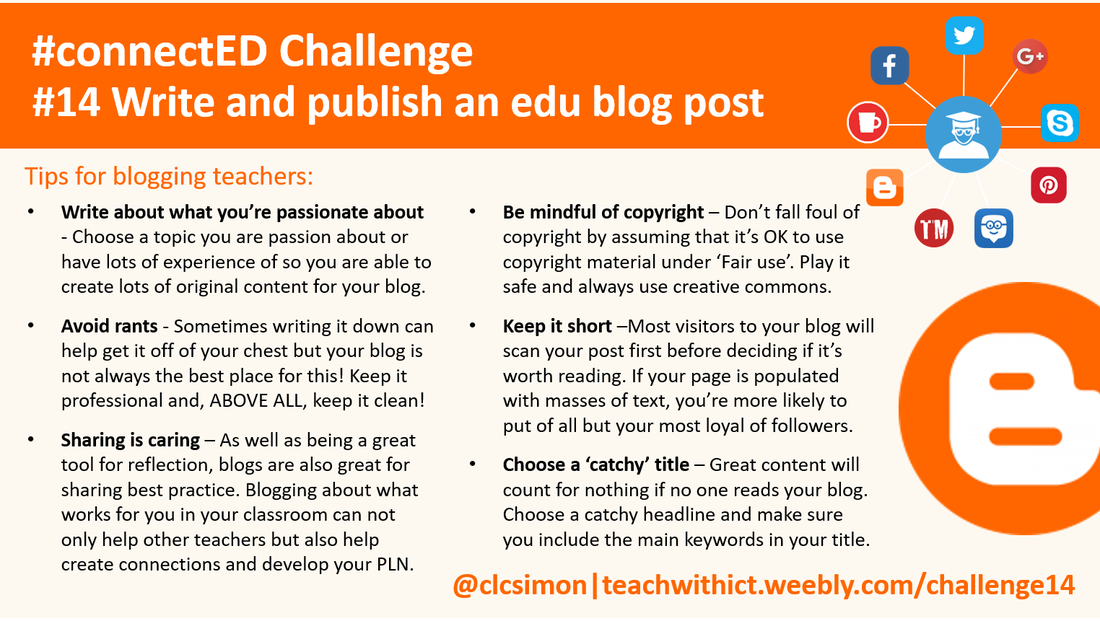
  • Write about what you’re passionate about - Choose a topic you are passion about or have lots of experience of so you are able to create lots of original content for your blog.
  • Avoid rants - Sometimes writing it down can help get it off of your chest but your blog is not always the best place for this! Keep it professional and, ABOVE ALL, keep it clean!
  • Sharing is caring – For me, the primary purpose of blogging is to be reflective however, as well as being a great tool for reflective practice, blogs are also great for sharing what works in the classroom! Blogging about what works for you in your classroom can not only help other teachers but also help create connections and develop your PLN.
  • Keep it short – With time being so precious, even more so for teachers, it should be of no surprise to you to hear that most visitors to your blog will scan your post first before deciding if it’s worth reading. If your page is populated with masses of text, you’re more likely to put of all but your most loyal of followers. Keep it short and keep it concise.
  • Be mindful of copyright - Many teachers fall foul of copyright by assuming that it’s OK to use copyright material under the ‘Fair use’ policy. Do not assume that the rules of fair or educational use automatically apply to all copyrighted content. The best way, I find, to be sure that you are not in breach of copyright law is to use creative commons.
  • Choose a catchy title. – No matter how great your content is, this will count for nothing if no one ever reads your blog. If you want to drive more traffic to your blog, choose a catchy headline and make sure you include the main keywords in your title. 


Tips for increasing traffic to your blog:
  • Be social – Most free hosting services such as weebly and edublogs allow you to connect your blog to your Twitter or Facebook account. By doing this, every time you publish a new post everyone who follows you will be notified.
  • Submit your blog to the major search engines – One way to get traffic to your blog is to submit it to all the major search engines. Most free education hosting services such as weebly, automatically submit your site to the most popular search engines however, you can also submit your blog yourself. Submitting your blog is absolutely free however, don’t expect to be listed straight away, some sites will take months to index or crawl your website and add it to their listings.
  • Exchanging links - Partnering up with other similar blogs and exchanging links is another way to send traffic to your blog – it’s also a great way to connect with other educators! Essentially, you place a link to someone else’s website on your own site and they do the same for you. 
  • Add a “Recommend This Site” or “Add This” link - Adding a "Recommend This Site" or “Add This” to your website using tools such  www.addthis.com/ can help improve your blog traffic. If someone visits your blog and knows of someone else who may appreciate it, they can use this feature to e-mail the page's link to a recipient or share the link via social networking sites such as Facebook and Twitter.


Useful links:
  • https://ictevangelist.com/i-worry-about-teachers-who-blog/ - Guidance for teachers who blog.
  • https://ictevangelist.com/mytop5-tips-blogging-reflective-practice/ Tips on blogging for reflective practice by Mark Anderson (@ICTevangelist)
  • https://www.teachertoolkit.me/2014/08/09/10-tips-for-blogging-teachers-by-teachertoolkit/ Tips for blogging teachers by Ross Morrison McGill (aka @TeacherToolkit)
Picture
Tips for writing blog posts (Crib Sheet)
Tags: blogger, blog design, free blog posting sites, blog posting sites, blog posting websites, where to post blogs for free, best blog websites, best blogs, best website for blogging, web page creator.
  • Home
  • AI
    • AI Literacy >
      • AI Alliteration
      • Describing Monsters
      • Dystopian writing
      • Bringing literacy to life with AI
      • AI Literacy Prompts
    • AI Computing >
      • AI Computing Lessons >
        • Fake News
        • Make me happy
        • Chatting Robot
        • Supervised Learning
        • Fooled
        • Socratic Debate
        • Moral Machine
        • Invisible Animals
      • AI Coding Strategies
      • AI Computing Prompts
    • AI Prompts
  • Teaching & Learning
    • Wellbeing
    • Blog
    • Humour >
      • Teacher Humour
      • Teacher Humor
    • PLN Challenge >
      • Covering your backside
      • Online Privacy
      • Twitter Challenge >
        • Twitter All Star
        • Challenge 1
        • Challenge 2
        • Challenge 3
        • Tips for staying safe on Twitter
        • Tips for hosting Edu Twitter Chats
        • Tips for taking part in Twitter chats
        • It's all about the hashtag! Essential chats for educators
        • How to storify a chat
        • How to schedule Tweets
        • Twitter Lists
        • NT2tEU
      • Facebook Challenge >
        • Challenge 4
        • Challenge 5
        • Challenge 6
        • Tips for staying safe on Facebook
      • Google Challenge >
        • Challenge 7
        • Challenge 8
        • Challenge 9
      • Pinterest Challenge >
        • Challenge 10
        • Challenge 11
        • Challenge 12
        • Tips for using Pinterest
      • Blog Challenge >
        • Challenge 13
        • Challenge 14
        • Challenge 15
        • How to create a classroom blog
      • Staffrm Challenge >
        • Challenge 16
        • Challenge 17
        • Challenge 18
      • Skype Challenge >
        • Challenge 19
        • Challenge 20
        • Challenge 21
      • Edmodo Challenge >
        • Challenge 22
        • Challenge 23
        • Challenge 24
      • TeachMeet Challenge >
        • Challenge 25
        • Challenge 26
        • Challenge 27
      • In-school challenge >
        • Challenge 28
        • Challenge 29
        • Challenge 30
      • 30 ways to grow your PLN
    • Tools for Teachers >
      • Web 2.0 >
        • Top 10 Web 2.0 Tools
        • Classroom Response Tools
      • Quiz Tools
      • Classroom Management Tools
      • Software >
        • Media Conversion Tools
        • Application Software
      • Multimedia >
        • Free Music
    • BYOD
    • Digital Leaders >
      • Digital Leaders Blog >
        • DL Archive
      • DL Tips
      • Quotes
      • Links
    • Flipped Learning >
      • Flipped Classroom vs. Blended Classroom
    • Gamification >
      • Gamification vs. Game Based Learning vs. Game Design
    • School Closures
    • Game Based Learning >
      • Minecraft >
        • Minecraft in Education
        • Minecraft Lesson Ideas
        • Minecraft Literacy
        • Real Life Minecraft
        • Minecraft Top Tips
        • Minecraft Coding Tutorials >
          • Minecraft Code Builder Setup
          • Minecraft Code: Walking on Air
          • Minecraft Code: Hello World
          • Minecraft Code: Functions
          • Minecraft Code: Rainbow
          • Minecraft Code: Skyscraper
          • Minecraft Pixel Art >
            • MC Pixel Art Painter
    • The magic of >
      • The magic of Computing
      • The magic of Maths
      • The magic of Science
      • The magic of Literacy
    • Road2e2
    • T&L Blog
  • Computing
    • Computing Blog >
      • GCSE Computer Science
      • General
    • Teaching Computer Science >
      • CPD >
        • Blocks to Code
        • Tutorials >
          • How to embed Flash into PowerPoint
          • How to embed YouTube videos in to PowerPoint
          • How to create a wiki
          • How to create a classroom blog
      • Schemes of Work
      • Programming Resources
      • Theory
      • Posters >
        • Binary Posters
        • Coding Posters
      • Festive Computing Activities
      • FLOPPYS 2020
      • FLOPPYS 2021
      • FLOPPYS 2022
      • Game Design
      • App Creation
    • Theory Lessons >
      • Theory Tests
      • Computer Hardware >
        • Input / Output
        • CPU
        • LMC
        • Storage Devices
        • Memory (RAM / ROM)
        • Hardware
      • Binary Lessons >
        • Units of Data
        • Binary & Denary >
          • Binary & Denary (Festive)
        • Binary Representation of Images >
          • Binary Representation of Images (Festive)
          • Pixel Painter
        • Binary Representation of Characters
        • Binary Representation of Sound >
          • ADC Simulator
        • Binary Representation of Instructions
        • Binary Addition
        • Hexadecimal
      • Software >
        • Operating System
        • Types of Software
        • Utility Software
      • Programming >
        • Flowcharts >
          • Tea Algorithm
          • Flow diagrams
      • Computational Thinking >
        • Data Science
    • Digital Literacy >
      • Social Media (Good or Bad thing?)
      • Cyberbullying
      • Staying Safe Online
    • Games >
      • Binary Games >
        • Binary Blitz!
        • Binary Brainiac
        • Binary Blaster
        • Binary Blast Off
        • Binary Flip
    • Binary >
      • ASCII Converter
      • Binary to Decimal
      • Binary to Hex
      • Binary Calculator
    • Escape Rooms >
      • Breakout Edu
      • Escape Timers >
        • Escape Timer
        • Team Timer
        • Binary Timer
      • Binary Escape
    • ICT Strand >
      • Fake News Project >
        • Fake News 1
        • Fake News 2
        • Fake News 3
        • Fake News 4
        • Fake News 5
      • Spreadsheet Modelling
      • Superhero Movie Trailer
      • PowerPoint Task
      • Digital Imaging
      • Paint 3D Tutorial
    • CS Toolkit >
      • AI Toolkit
      • Binary Toolkit
      • Coding Toolkit
    • Coding Strategies >
      • Worked Examples
      • Code Tracing
      • Parsons Problems
      • PRIMM
    • Programming Lessons >
      • Scratch >
        • Festive Scratch >
          • Music Festive with Scratch
          • Turtle Snowflakes
          • What's your elf name
          • Secret Santa
        • Making music with Scratch
        • Sorting Hat Lesson
        • Turtle Time
        • Superhero name generator
        • Compliment Generator
        • Magic 8 ball
      • Python >
        • Chatbot
        • Coding Golf
        • Turtle Time >
          • Turtle Instructions
        • Magic 8 ball
        • Python Mad Libs
        • Rock Paper Scissors
        • Shakespearean Insult Generator >
          • Shakespearean Insult Generator Part 2
        • Compliment generator
        • Sorting Hat
        • Superhero name generator
        • Cards Against
        • Guess the word
        • Guess the number
        • Festive Python >
          • What's your elf name
          • Secret Santa
          • Turtle Snowflakes
          • Let It Snow
      • Little Man Computer
      • Hour of Code >
        • Hour of Code Music
        • Python Tutorials
        • HoC 8-Bit Challenge
        • Music MicroPython (Festive)
      • Raspberry Pi >
        • Networking the Pi
        • Minecraft Pi
        • Harry Potter Sorting Hat >
          • Harry Potter Sorting Hat (GPIO)
        • Raspberry Pi LTSP (Networked Classroom)
        • Astro Pi
    • Homeschooling
    • Remote Learning >
      • Fun Python Tutorials
      • Python Tutorials >
        • Chatbot Tutorial
        • Dice Roll
        • Turtle Tutorial
        • Magic 8 ball
        • Sorting Hat
        • Rock Paper Scissors Tutorial
        • Cards Against
        • Python Mad Libs
        • Shakespearean Insult Generator >
          • Shakespearean Insult Generator Part 2
        • Guess the word
        • Guess the number
        • Superhero name generator
        • Compliment generator
        • Festive Python Tutorials >
          • What's your elf name
          • Secret Santa
          • Turtle Snowflakes
      • Scratch Tutorials >
        • Sorting Hat
        • What's your superhero name
        • Turtle Time Tutorial
        • Compliment Generator
        • Magic 8 Ball
        • Festive Scratch Tutorials >
          • Festive Music with Scratch
          • Secret Santa Scratch Tutorial
          • Turtle Snowflakes Tutorial
          • What's your elf name
    • Revision >
      • Data Representation >
        • Binary Representation of Images
        • Binary Representation of Sound
  • 21 Things
    • 21 Things To Try >
      • ConnectEd
      • Social Media >
        • Twitter
        • Pinterest
        • Facebook Groups
        • Facebook Pages
        • Google+ Communities
        • Staffrm
        • Edmodo
        • Mystery Skype
        • Blogging
        • Classroom Blogging
      • Gamification
      • Flipped Classroom
      • Breakout Edu
      • Edu Podcasts
      • Jar of Awesome
      • TeachMeet
      • Team Teaching
      • Mixed Reality
      • Digital Leaders
      • Genius Hour
      • Sketchnoting
    • Computing >
      • CS 20
      • Code Golf
      • PRIMM
      • Under The Hood
      • Unplugged
      • Podcasts
      • Facebook Groups CS
      • Flipped Classroom CS
      • Teach with Magic
      • Socratic Debate
      • Coding Music
    • 21 Things Keep Fit >
      • 20 Health Hacks
      • Home Health Hacks
    • 21 Things PLN >
      • Edmodo
      • Twitter
      • Reply to a blog
      • Skype
      • Cofee Edu
      • Pinterest
      • Reach out
      • Conferences
      • Instagram
      • Ning
      • MEC
      • Voxer
      • LinkedIn
  • Microbit
    • Physical Computing >
      • micro:bit LEDs
      • micro:bit PIR
      • micro:bit Servo
      • micro:bit Temp
      • micro:bit LDR
      • micro:bit Moisture
      • micro:bit RGB LEDs
      • micro:bit HC-SR04 3v3
      • micro:bit HC-SR04 5v
      • micro:bit Push button
      • micro:bit Potentiometer
      • micro:bit Piezo
    • Music >
      • Music Festive
    • Festive Projects
    • Projects >
      • Music
      • Music MicroPython
      • Servo Animals
    • Lessons >
      • Magic 8 Ball
      • Harry Potter Sorting Hat
    • Quick Start Guide
    • Microbit Simulator
  • #100 Ideas
    • Testimonials
    • Competition >
      • Competition 2
    • Worksheets
    • Bonus Ideas >
      • What's your elf name
      • Make me happy
      • Guess the word
      • Cards Against Humanities
      • Compliment generator
      • Data Science
    • Curriculum
    • ISTE
    • CSTA
  • About
    • Privacy
