

Fake News - Walking with Mammoths
This lesson is aligned with the National Curriculum in England: Secondary Curriculum (Key Stage 2/3), Curriculum for Wales (Digital Competence Framework), ISTE standards for students, CSTA K-12 CS standards, NGSS (Next Generation Science Standards, and Common Core State Standards - ELA.
This lesson is part of the AI Literacy Pack - A series of one-off lessons to teach AI literacy and AI theory. Click here to find out more.
Overview:
In this lesson, pupils learn about ‘fake news’ and how to spot fake content created using generative AI.
Keywords: Fake news, deep fakes, generative AI, credibility, fact checking
Learning Objectives:
Materials needed:
This lesson is part of the AI Literacy Pack - A series of one-off lessons to teach AI literacy and AI theory. Click here to find out more.
Overview:
In this lesson, pupils learn about ‘fake news’ and how to spot fake content created using generative AI.
Keywords: Fake news, deep fakes, generative AI, credibility, fact checking
Learning Objectives:
- Identify features of fake or misleading websites.
- Use the “5 Ws” (Who, What, When, Where, Why) to assess trustworthiness.
- Understand motivations behind creating and sharing fake news.
- Explore how generative AI contributes to both fake news creation and detection
- Reflect on the impact of misinformation and how to combat it.
Materials needed:
- Internet-enabled devices (laptops/tablets)
- Access to selected websites:
- Optional version (for younger audiences): https://science-resources.co.uk/KS2/Extinct_Animals/Mammoth_Rewilding.html
- Projector or smartboard
- Printed “5 Ws” checklist
- Access to Google Images or Bing for reverse image search
- Fact-checking websites (Snopes, FactCheck.org)
Curriculum Mapping:
KS2 Computing:
- Use logical reasoning to explain how some simple algorithms work and to detect and correct errors in algorithms and programs.
- Use search technologies effectively; evaluate digital content; use technology safely and responsibly.
KS3 Computing:
- Understand the hardware and software components that make up computer systems, and how they communicate with one another and with other systems.
- Protect online identity and privacy; recognise inappropriate content and conduct; create and evaluate digital artefacts.
Digital Competence Framework:
- Citizenship: Identity, image, reputation, online behaviour, digital rights.
- Data & Computational Thinking: Data and information literacy.
- 1.2 Digital Citizen: Ethical and safe behaviour online; managing digital privacy.
- 1.3 Knowledge Constructor: Research strategies; evaluating credibility and relevance.
- 1.5c Computational Thinker: Students break problems into component parts, extract key information, and develop descriptive models to understand complex systems or facilitate problem-solving.
- 1.7 Global Collaborator: Students use digital tools to broaden their perspectives and enrich their learning by collaborating with others and working effectively in teams locally and globally.
Algorithms and Programming (AP):
- 1B-AP-15: Test and debug (identify and fix errors) a program or algorithm to ensure it runs as intended.
Impacts of Computing (IC):
- 2-IC-07: Compare positive and negative impacts of technology.
- 2-IC-08: Legal and ethical responsibilities of digital content.
- 3A-IC-11: Social and economic implications of digital privacy.
- 3A-IC-13: Ethical implications of AI and machine learning.
- MS-ETS1-1: Define criteria and constraints of a design problem.
- HS-ETS1-3: Evaluate solutions to real-world problems.
- Science Practices: Analysing data, engaging in argument from evidence.
- Crosscutting Concepts: Cause and effect; systems and system models.
- RI.6.8: Evaluate arguments and claims.
- RI.7.7: Compare text to multimedia versions.
- W.8.1: Write arguments with evidence.
- SL.7.1: Engage in collaborative discussions.
Starter ( 5 mins):
- Have students share their news sources, such as social media (like TikTok or Instagram), news websites, (like bbc.co.uk/news), or TV.
- Ask the students to explain what they think is meant by the term ‘fake news’. Draw out answers such as ‘news or stories on the internet that are not true’ and ‘news or stories designed to make people believe things that are made up'.
- Ask the students if they check if a story is true before they share it with their friends? Explain to students that fake images / videos are often used to help back up a story to make it more believable.
Guided Practice - Paired activity (15 mins):
Websites:
Are you a primary / middle school teacher?
You can also find a KS2 / middle school friendly version of the mammoth rewilding website here:
- Inform the students that, in this lesson, they will be assuming the role of internet detectives whose job is to spot the fakes from a selection of websites.
- Put the students into pairs and share the following list of websites, along with worksheet 1 (see below). Instruct the students to visit each of the website on the list, below, and decide which sites are ‘fake’ or ‘real’ and why.
- Encourage use of reverse image search, visual clues, and fact-checking tools.
- Also encourage the students to click on the links contained in each story, to corroborate the websites authenticity - in particular Callum Stewarts wildlife photography website: callumstewartsphotography.weebly.com
Websites:
- https://i-how.org.uk/how/Science/How-weird.htm - How weird - 10 Unusual Animals from Around the World
- https://science-resources.co.uk/Mammoth_Revival.html - Woolly Mammoths Return to the Highlands
Are you a primary / middle school teacher?
You can also find a KS2 / middle school friendly version of the mammoth rewilding website here:
- https://science-resources.co.uk/KS2/Extinct_Animals/Mammoth_Rewilding.html - Woolly Mammoths Return to the Highlands
Resources
Student worksheet

| website_credibility_worksheet.docx |
KS2 / middle school version:
| website_credibility_worksheet_ks2.docx |
Fact checking helpguide

| fake_news_helpguide.pdf |
|
Guidance:
When deciding if each website is 'real' or 'fake', encourage students to use the 5 W’s (Where, What, When Why, Who) 5 W's: Where is the article / website located?
What information are you getting?
When was the article created / last updated?
Why would you use the article / website as a source of information?
Who is the source of information?
Other ways to detect fake news articles Here are strategies students can use to determine if an image, video, or online article is real or fake, especially in the era of generative AI:
|
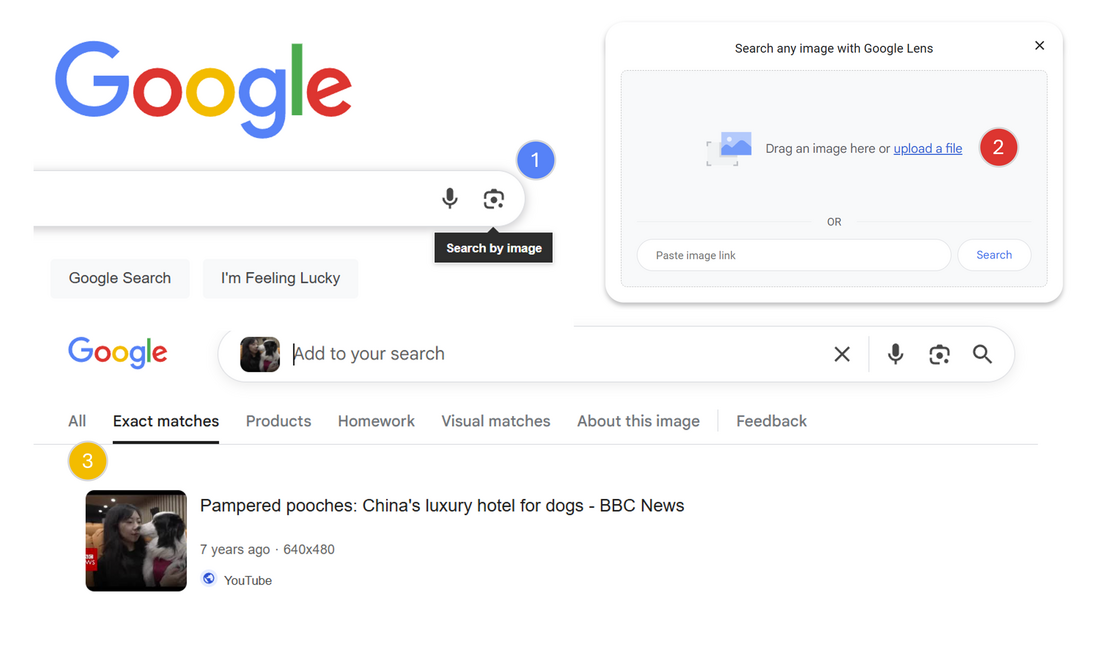
Google reverse image search
|
How can AI help in the fight against ‘Fake news’?
In these situations, AI can contribute to making fake news appear more convincing. However, AI can also assist in verifying information by checking against a large database of online articles. |
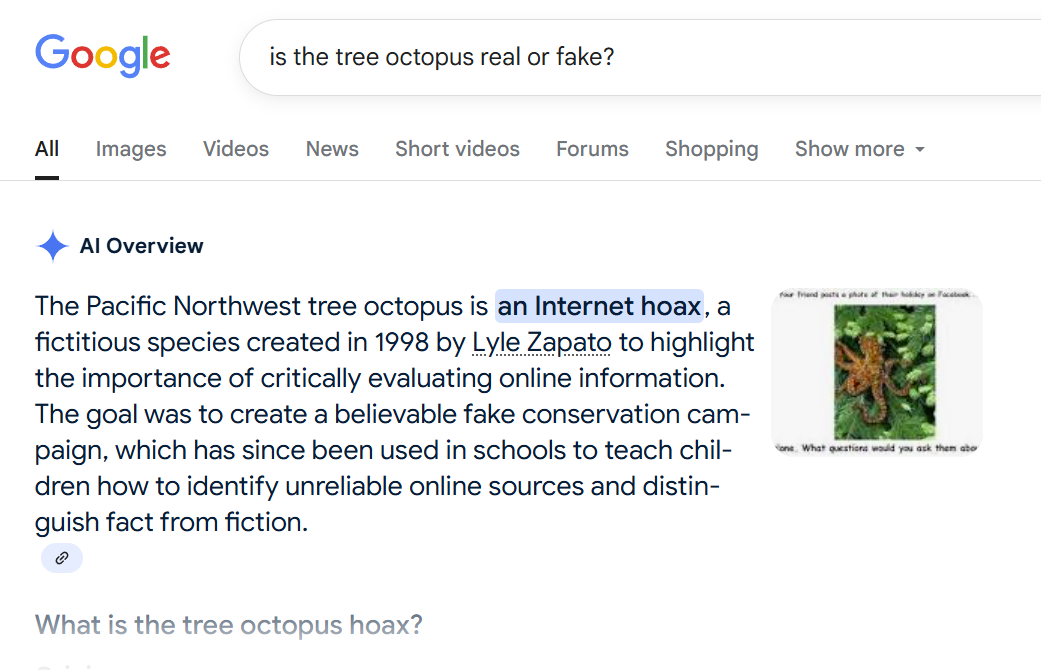
Asking Google Gemini if the Pacific Northwest tree octopus is real or fake.
Discussion / Answers (5 mins):
Start by loading each of the websites (above) and ask the students for a show of hands as to whether each website is ‘Fake’ or ‘Real’. Reveal the answers (below) and ask for volunteers to explain their answers. Use questioning to prompt discussion, for example:
Answers:
Explain to the students that, while the mammoth rewilding page looks realistic, the content they were exploring, along with the photographer's website, was created as a hoax. This was a test to see how well they could critically evaluate information they find online. Say, while the rest of the website (science-resources.co.uk) is real, the specific page they saw was designed as a learning exercise.
Inform the students that every piece of content on that page—the text, images, and even the videos—was generated using modern AI tools. ChatGPT and Microsoft 365 Copilot was used to write the text, and Google Gemini and Google VEO 3 was used to create the images and videos.
Discuss the motivations behind fake news creation and the role of AI in spreading or combating it. Suggested questions:
You could also ask students to share any examples they have seen online (e.g., on social media) that they thought was real but now think might be fake.
Start by loading each of the websites (above) and ask the students for a show of hands as to whether each website is ‘Fake’ or ‘Real’. Reveal the answers (below) and ask for volunteers to explain their answers. Use questioning to prompt discussion, for example:
- What about this site makes it seem real or fake?
- What evidence did you find to support your decision?
Answers:
- https://i-how.org.uk/how/Science/How-weird.htm - How weird - 10 Unusual Animals from Around the World - Real
- https://science-resources.co.uk/Mammoth_Revival.html - Woolly Mammoths Return to the Highlands - Fake
Explain to the students that, while the mammoth rewilding page looks realistic, the content they were exploring, along with the photographer's website, was created as a hoax. This was a test to see how well they could critically evaluate information they find online. Say, while the rest of the website (science-resources.co.uk) is real, the specific page they saw was designed as a learning exercise.
Inform the students that every piece of content on that page—the text, images, and even the videos—was generated using modern AI tools. ChatGPT and Microsoft 365 Copilot was used to write the text, and Google Gemini and Google VEO 3 was used to create the images and videos.
Discuss the motivations behind fake news creation and the role of AI in spreading or combating it. Suggested questions:
- Why would someone want to create a site like this?
- What are the potential consequences of fake AI generated content?
- What can we do if we spot fake AI generated content?
You could also ask students to share any examples they have seen online (e.g., on social media) that they thought was real but now think might be fake.
Group activity (15 mins):
Place the students into small groups. Challenge them to create their own unique fact-checking tool. Tell the students that they can use one of the following formats, or come up with their very own tool!
Examples:
Share the following examples:
F.A.K.E.
T.R.U.E.
Top tip: Encourage the students to start by listing all the strategies they can use to spot real or fake content, such as:
Place the students into small groups. Challenge them to create their own unique fact-checking tool. Tell the students that they can use one of the following formats, or come up with their very own tool!
Examples:
- Acronym: Create a new word where each letter stands for a fact-checking step.
- Acrostic: Create a memorable sentence where each first letter corresponds to a step.
- Rhyme or Jingle: Write a short poem or song lyric that lists the key steps.
- Visual Diagram: Draw a simple chart, a flowchart, or a poster with pictures representing the steps.
Share the following examples:
F.A.K.E.
- Find the source – Who published this? Is it credible?
- Analyse the content – Does it look professional? Any spelling errors?
- Know the facts – Can you verify this with trusted sources?
- Evaluate intent – Is it trying to mislead, sell, or scare you?
T.R.U.E.
- Trustworthiness – Does the site have a good reputation?
- References – Are there credible citations or links?
- Up-to-date – Is the information current?
- Evidence – Are claims supported by facts?
Top tip: Encourage the students to start by listing all the strategies they can use to spot real or fake content, such as:
- Checking the website's domain (e.g., .com vs. .org)
- Looking for weird visual details (like hands)
- Doing a reverse image search
- Checking the author's credentials
- Watching for emotional or sensational language
Plenary:
Ask for volunteers, or pick a group at random, to share their method for detecting fake content.
Ask the students, in each group, to describe their method and to explain why they think it is effective and easy to remember.
Ask for volunteers, or pick a group at random, to share their method for detecting fake content.
Ask the students, in each group, to describe their method and to explain why they think it is effective and easy to remember.
Differentiation strategies:
Assessment methods:
- Provide simplified KS2 / middle school version of the website for younger learners.
- Offer sentence starters and vocabulary support.
- Action & Expression (UDL): Allow students to present their findings in various formats (e.g., oral presentation, written summary, short video clip, drawing with labels).
- Engagement (UDL): Introduce a "believability scale" where students rate the believability of different claims from the website and justify their rating.
Assessment methods:
- Group presentations of fact-checking tools.
- Credibility comparison discussion.
- Observation of group/pair discussions and website analysis.
- Written justification of fake/real decisions.
- Participation in discussion.
- Exit ticket:
- Identify two pieces of questionable information from one site.
- Explain why the site is not a reliable source using specific examples
Taking it further
Here are some suggestions for taking the lesson further:
Activity 1: Socratic Debate
See: How to deliver a Socratic Debate lesson
Objective: To explore the ethical dilemmas of AI-generated content and form a reasoned opinion.
How it works: Divide the class into small groups and present them with a scenario. For example:
Task: Each group discusses the scenario and prepares three arguments to support their point of view. They then present their arguments to the class for a friendly debate.
Here are some suggestions for taking the lesson further:
Activity 1: Socratic Debate
See: How to deliver a Socratic Debate lesson
Objective: To explore the ethical dilemmas of AI-generated content and form a reasoned opinion.
How it works: Divide the class into small groups and present them with a scenario. For example:
- Scenario 1 (Deep fakes): A fake AI video shows a world leader spreading false information. It goes viral, causing panic.
Questions:- Who is responsible—the creator, the platform, or the AI company?
- Should governments regulate political deepfakes?
- Scenario 2 (AI & Education): A student uses AI to write an essay for their GCSE coursework. They argue it’s just a tool, like a calculator.
Questions:- Should schools ban AI tools or teach students how to use them responsibly?
- Does using AI for homework harm creativity and critical thinking?
- Scenario 3 (Art & Ownership): An AI creates a song that sounds exactly like a famous artist’s style and voice. The song goes viral, and many fans think it’s real.
Questions:- Is this innovation or theft?
- Should artists have legal rights over AI-generated imitations of their voice or style?
- Scenario 4 (Social media): An influencer shares a fake news story, believing it’s real. It turns out to be an AI deepfake and spreads to millions causing anger and protests.
Questions:- Who is to blame – the original creator, the influencer for not checking the facts, the followers who re-shared it?
- How can platforms stop fake videos without stifling creativity?
- What can we do to stop the spread of potentially harmful misinformation?
Task: Each group discusses the scenario and prepares three arguments to support their point of view. They then present their arguments to the class for a friendly debate.
Activity 2: Human vs. AI - Spot the difference
Objective: To critically evaluate content and develop an understanding of AI's capabilities and limitations.
How it works: Prepare a short quiz with examples of text and images. Some are created by humans, and others are generated by AI.
Text Examples: You could have two short poems, two news headlines, or two short paragraphs describing a historical event.
Image Examples: Use images of animals, people, landscapes, or objects.
Task: Students work in pairs to decide which examples they think were made by a human and which by AI. The key part of the activity is for them to explain the clues that led them to their decision. Was it a weird detail in the image? Did the text sound a bit strange or too perfect?
Objective: To critically evaluate content and develop an understanding of AI's capabilities and limitations.
How it works: Prepare a short quiz with examples of text and images. Some are created by humans, and others are generated by AI.
Text Examples: You could have two short poems, two news headlines, or two short paragraphs describing a historical event.
Image Examples: Use images of animals, people, landscapes, or objects.
Task: Students work in pairs to decide which examples they think were made by a human and which by AI. The key part of the activity is for them to explain the clues that led them to their decision. Was it a weird detail in the image? Did the text sound a bit strange or too perfect?
Activity 3: AI energy detectives
Objective: To understand the hidden environmental impact (sustainability) of using generative AI and data centres.
How it works: Start with a simple analogy. For example: "Did you know that generating an image is roughly equal to fully charging your mobile phone?"
Task: In groups, students research and create an infographic or a short presentation on the "sustainability impact" of AI. They should try to answer questions like:
Extension: Have students brainstorm some simple rules to use technology more mindfully, thinking twice before making a complex AI query or being more careful when crafting prompts.
Objective: To understand the hidden environmental impact (sustainability) of using generative AI and data centres.
How it works: Start with a simple analogy. For example: "Did you know that generating an image is roughly equal to fully charging your mobile phone?"
Task: In groups, students research and create an infographic or a short presentation on the "sustainability impact" of AI. They should try to answer questions like:
- Where does the energy to power AI come from?
- What is a "data centre" and why does it use so much power/water?
- What are some ideas for making technology more "green"?
Extension: Have students brainstorm some simple rules to use technology more mindfully, thinking twice before making a complex AI query or being more careful when crafting prompts.
Activity 4: Faking it
Note: This activity requires student access to generative AI tools such as Copilot for students, Gemini for students, or an Adobe Express student account.
Objective: To explore how easy it is to create AI generated fake content.
Task: Students use suitable/age appropriate generative AI tools to create their own fake news story.
Note: This activity requires student access to generative AI tools such as Copilot for students, Gemini for students, or an Adobe Express student account.
Objective: To explore how easy it is to create AI generated fake content.
Task: Students use suitable/age appropriate generative AI tools to create their own fake news story.