

|
Buy:
|
Machine Learning: Make Me Happy
Note: Lesson plan and resources for this activity can be found at the bottom of this page.
Overview
|
In this lesson, students will make a character that reacts to what you say.
|
|
Instructions
Machine Learning for Kids is a free online tool for introducing children to how Machine Learning systems are trained, how they are used, and some of the real-world applications of Artificial Intelligence (AI).
Explain to the students that they will be making a chatbot that reacts to what they say. If they complement it, it will look happy. If they insult
it, it will look sad. Direct students to machinelearningforkids.co.uk and have them click on ‘try it now’. Ask the students to follow the on-screen instructions to create a machine learning project which recognises ‘text’.
Next, have the students ‘train’ their bot – the students will need to create two labels (one called ‘kind things’ and another called ‘mean things’) and populate each label with examples. The students will need provide at least 6 examples of each.
Once the training is complete, have the students test their model to see what the computer has learned. It is recommended that the students start by testing the model using the examples they supplied before trying examples that the computer hasn’t seen. Once the students are happy with their trained model, they can move on to coding their sentiment analysis bot in Scratch.
Explain to the students that they will be making a chatbot that reacts to what they say. If they complement it, it will look happy. If they insult
it, it will look sad. Direct students to machinelearningforkids.co.uk and have them click on ‘try it now’. Ask the students to follow the on-screen instructions to create a machine learning project which recognises ‘text’.
Next, have the students ‘train’ their bot – the students will need to create two labels (one called ‘kind things’ and another called ‘mean things’) and populate each label with examples. The students will need provide at least 6 examples of each.
Once the training is complete, have the students test their model to see what the computer has learned. It is recommended that the students start by testing the model using the examples they supplied before trying examples that the computer hasn’t seen. Once the students are happy with their trained model, they can move on to coding their sentiment analysis bot in Scratch.
Theory
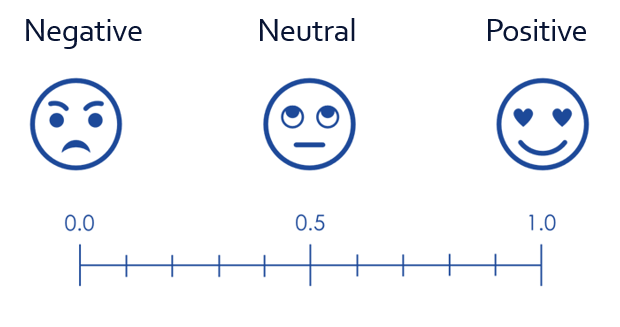
Sentiment analysis, also known as opinion mining, is a technique in artificial intelligence (AI) that involves analysing text data to determine the sentiment expressed in it. This sentiment can be classified as positive, negative, or neutral.
Sentiment analysis returns a numeric score between zero (0) and one (1). Zero indicating 100% negative sentiment and one indicating 100% positive sentiment.
- Purpose: It helps in understanding the emotional tone behind a series of words, which is useful for gauging public opinion, customer feedback, and market research.
- Techniques: It uses Natural Language Processing (NLP), machine learning, and AI to detect subjective information in text data.
- Applications: Commonly used in analysing social media posts, customer reviews, and support conversations to improve customer experience and brand reputation.
Sentiment analysis returns a numeric score between zero (0) and one (1). Zero indicating 100% negative sentiment and one indicating 100% positive sentiment.
Lesson Plan
Lesson Plan: Make Me Happy
Creating a Machine Learning Sentiment Analysis Bot
This lesson is aligned with the National Curriculum in England: Secondary Curriculum (Key Stage 2/3), Curriculum for Wales (Digital Competence Framework), ISTE standards for students, and CSTA K-12 CS standards.
Learning Objectives
Materials Needed
Curriculum Mapping
Creating a Machine Learning Sentiment Analysis Bot
This lesson is aligned with the National Curriculum in England: Secondary Curriculum (Key Stage 2/3), Curriculum for Wales (Digital Competence Framework), ISTE standards for students, and CSTA K-12 CS standards.
Learning Objectives
- Understand the basic principles of machine learning and its applications.
- Develop skills in creating and training a machine learning model.
- Create a sentiment analysis chatbot using Scratch and machinelearningforkids.co.uk.
- Apply logical reasoning and problem-solving skills in a computational context.
Materials Needed
- Computers with internet access
- Access to machinelearningforkids.co.uk
- Scratch 3 (online version via machinelearningforkids.co.uk)
- Projector and screen for demonstration
- Handouts with step-by-step instructions (see resources below)
Curriculum Mapping
KS2 Computing:
- Design, write and debug programs that accomplish specific goals, including controlling or simulating physical systems; solve problems by decomposing them into smaller parts.
- Use sequence, selection, and repetition in programs; work with variables and various forms of input and output.
- Use logical reasoning to explain how some simple algorithms work and to detect and correct errors in algorithms and programs.
KS3 Computing:
- Use two or more programming languages, at least one of which is textual, to solve a variety of computational problems.
- Make appropriate use of data structures [for example, lists, tables or arrays].
Science and Technology AoLE (Computation is the foundation for our digital world):
- Progression Step 3: "I can use conditional statements to add control and decision-making to algorithms." and "I can identify repeating patterns and use loops to make my algorithms more concise."
- Progression Step 4: "I can decompose given problems and select appropriate constructs to express solutions in a variety of environments."
Digital Competence Framework (DCF):
- Producing: The lesson involves planning and creating digital content (a program) and then evaluating and improving it.
- Data and computational thinking: This is the core of the lesson, focusing on problem-solving, modeling a concept (happiness) with data, and understanding how algorithms work.
1.4 Innovative Designer:
- Students use a variety of technologies within a design process to identify and solve problems by creating new, useful, or imaginative solutions.
1.5 Computational Thinker:
- 5c: Students break problems into component parts, extract key information, and develop descriptive models to understand complex systems or facilitate problem-solving.
- 5d: Students understand how automation works and use algorithmic thinking to develop a sequence of steps to create and test automated solutions.
Algorithms and Programming (AP):
- 1B-AP-09: Create programs that use variables to store and modify data.
- 1B-AP-10: Create programs that include sequences, events, loops, and conditionals.
- 1B-AP-11: Decompose (break down) problems into smaller, manageable subproblems to facilitate the program development process.
- 1B-AP-15: Test and debug (identify and fix errors) a program or algorithm to ensure it runs as intended.
- 2-AP-11: Create clearly named variables that represent different data types and perform operations on their values.
- 2-AP-12: Design and iteratively develop programs that combine control structures, including nested loops and compound conditionals.
Lesson Outline
Starter (10 mins)
Objective: Introduce the concept of AI and machine learning.
Introduction (10 mins)
Objective: Introduce the topic of machine learning and sentiment analysis.
Hands-On Activity (30 mins)
Objective: Students to create and train a sentiment analysis model and build a chatbot using Scratch.
Plenary (10 mins)
Objective: Gauge student understanding and provide feedback.
Assessment Criteria
Starter (10 mins)
Objective: Introduce the concept of AI and machine learning.
- Think-Pair-Share: Begin with a brief discussion on Artificial Intelligence and its real-world applications (e.g., virtual assistants, recommendation systems).
- Place students into pairs and have them list as many AI applications they can think of. After a few minutes, invite students to share examples of everyday AI applications.
- Show this short video explaining machine learning in simple terms >> What is Machine Learning? - YouTube (https://www.youtube.com/watch?v=f_uwKZIAeM0)
- Explain that machine learning is all around us; on our phones, powering social networks, helping us to decide what music to listen to or which movies to watch - it's pretty much everywhere.
Introduction (10 mins)
Objective: Introduce the topic of machine learning and sentiment analysis.
- Introduce the concept of sentiment analysis and how it can be used to determine the emotional tone of text.
- Explain that sentiment analysis is like a special tool that helps us understand how people feel when they write something. Imagine you have a magic wand that can read a message and tell you if the person who wrote it is happy, sad, angry, or excited.
- Say, when you post something on a platform like Instagram or X, sentiment analysis can look at the comments and tell if people are reacting positively or negatively. This can help the platform show you more content that you like and less of what you don't. It also helps in identifying any harmful or bullying comments so they can be addressed quickly.
- Inform the students that they will be creating a chatbot, using an experimental version of Scratch, that reacts to kind and mean comments using machine learning.
Hands-On Activity (30 mins)
Objective: Students to create and train a sentiment analysis model and build a chatbot using Scratch.
- Direct students to machinelearningforkids.co.uk and have them click on 'try it now'.
- Guide students through creating a machine learning project that recognises text.
- Instruct students to create two labels: 'kind things' and 'mean things', and provide at least 6 examples for each.
- Once the training is complete, have students test their model using the examples they supplied and new ones.
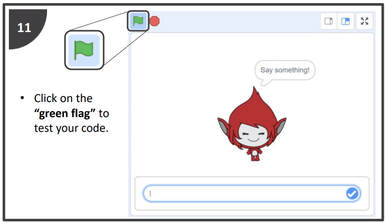
- Once students are satisfied with their model, guide them in creating a sentiment analysis bot using Scratch, following the provided instructions.
- Assist students as needed, encouraging peer support and collaboration.
Plenary (10 mins)
Objective: Gauge student understanding and provide feedback.
- Have students demonstrate their chatbots and explain how they trained their models.
- Ask questions to assess their understanding of machine learning concepts and the project process. For example:
- Can you explain what machine learning is in your own words?
- Why do you think it's important to provide examples for the labels 'kind things' and 'mean things'?
- How did you decide which examples to use for training your model?
- What did you notice about how the model responds to new examples?
- Can you describe the steps you took to create and train your sentiment analysis model?
- What challenges did you face while testing your model? How did you overcome them?
- What improvements would you make to your model or chatbot if you had more time?
- How do you think sentiment analysis can be used in real-life applications?
- What did you find most interesting about this project? Why?
Assessment Criteria
- Understanding of machine learning concepts and applications.
- Ability to create and train a machine learning model with appropriate examples.
- Successful creation of a sentiment analysis chatbot using Scratch.
- Participation in discussions and activities, demonstrating engagement and curiosity.
- Quality of explanations and reflections during the formative assessment.
Step-by-step instructions:

| make_me_happy.pdf |